Under a jam's time pressure, the right tools can mean the difference between a finished project and burnout
Game jams like Global Game Jam challenge you to create a playable game in just 48-72 hours. Whether you're working solo or with a team, the right tools can mean the difference between a finished project and burnout.
Here are five essential resources for game jam beginners.
1. Prototyping, design & testing: Arcweave
Before writing code or importing assets, you need to validate your game's core structure. In a 48-hour sprint, building directly in an engine wastes time on mechanics that don't work or features that don't fit.
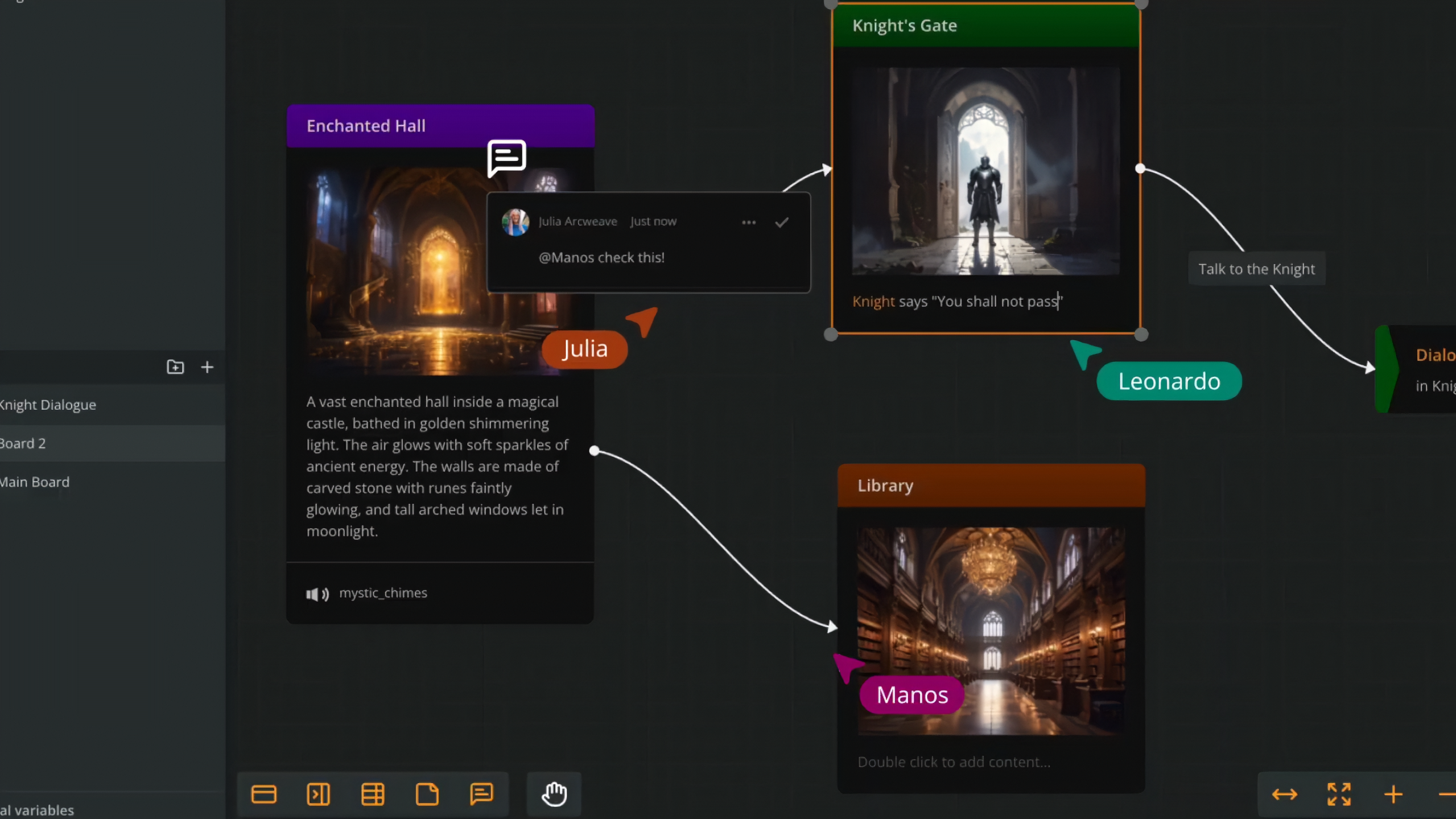
Arcweave is a visual design tool that lets you prototype game logic, test player flows, and organize data, all before touching your game engine.
Key features for jammers:
- Visual flowcharts: Map game states, quest chains, dialogue branches, and decision points with drag-and-drop nodes. See your entire game structure at a glance.
- Components system: Create reusable data cards for characters, items, locations, and abilities. Store stats, descriptions, and relationships in one organized place instead of scattered spreadsheets.
- Variables & logic: Use arcscript to prototype game rules like health systems, inventory checks, or win conditions. Test "if player has key, unlock door" logic without writing C# or Python.
- Play Mode: Press Play to immediately run your game design as an interactive prototype. Test pacing, catch logic errors, and validate player choices before building anything in Unity or Godot.
- Real-time collaboration: Designers, writers, and programmers work in the same project simultaneously. See teammates' cursors move in real-time, leave comments directly on game elements, and use built-in chat to eliminate Discord switching.
Jam workflow:
- Map your core loop in Arcweave, define the 30-second cycle that players repeat
- Use Play Mode to test game flow with non-team members
- Export structured data to Unity, Unreal, or Godot via official plugins
- If coding falls behind, share your Arcweave Play Mode as a browser-based visual novel.
Beginner tip: Arcweave's free tier includes 3 projects with 200 elements each, more than enough for a jam entry. Start with the Game Engine Example template to see game systems in action.
2. Asset libraries: Stop creating from scratch
You're halfway through your jam and someone realizes you need character sprites, UI sounds, and background music. Now you're spending hours on assets instead of gameplay.
In 48 hours, creating original art and audio is unrealistic. Professional jammers use free asset packs and focus creative energy on unique gameplay mechanics.
What to use:
itch.io Asset Packs
Massive library of free and paid game assets. Filter by license, style, and type. Most are jam-friendly with clear usage rights.
Kenney
Thousands of CC0 (public domain) assets. No attribution required. Clean, consistent art style across packs. Perfect for prototyping.
OpenGameArt
Community-driven asset repository. Mix of quality levels but well-tagged and searchable. Great for finding that one specific thing you need.
Freesound
Sound effects library with Creative Commons licensing. Essential for UI sounds, ambience, and audio feedback.
Game-icons
A library of free icons that you can use as you wish. You can download them in various colours and formats.
🎯 Pre-Jam Action: Create a shared Google Drive folder with pre-approved asset packs before the jam starts. Agree on art style (pixel art vs. low-poly 3D) in your first team meeting to avoid last-minute style mismatches.
3. Communication: Discord & visual brainstorming
Game jams are creative sprints, not marathons. Without structure, teams waste hours on scope creep, miscommunication, or solving problems that don't matter.
What to Use:
Discord or Slack
Set up dedicated channels: #code, #art, #narrative, #bugs, #memes. Pin important decisions. Voice channels for quick sync.
Arcweave, Miro or FigJam
Visual brainstorming boards for early ideation. Sticky notes, sketches, mind maps. Everyone can contribute simultaneously.
Direct integration bonus:
Share your Arcweave Play Mode links directly in Discord. Instant testing without leaving the conversation. "Check this branch, does the choice make sense?" Click, play, feedback. Done.
Communication best practices: Most game jam failures happen because teammates assume everyone understands the vision. Use Arcweave's comments and notes features to leave context directly on design elements, "programmer: this quest needs 3 enemy types" or "artist: this character needs a walk cycle." This eliminates "what did we decide?" questions at 3 AM.
4. Game engines: Pick your platform
Even prototypes need a runtime environment. Choose an engine based on your team's existing skills, learning a new engine during a jam is a recipe for disaster.
Beginner-friendly options:
| Engine | Best For | Learning Curve | Arcweave Integration |
|---|---|---|---|
| Unity | 2D/3D flexibility, massive asset store | Medium (C#) | Official plugin |
| Godot | Lightweight, open-source, Linux-friendly | Smooth (GDScript ≈ Python) | Official plugin |
| Unreal Engine | High-fidelity 3D, Blueprint visual scripting | Steep (C++ optional) | Official plugin |
| GameMaker Studio | 2D-focused, drag-and-drop + code hybrid | Smooth (GML) | JSON export |
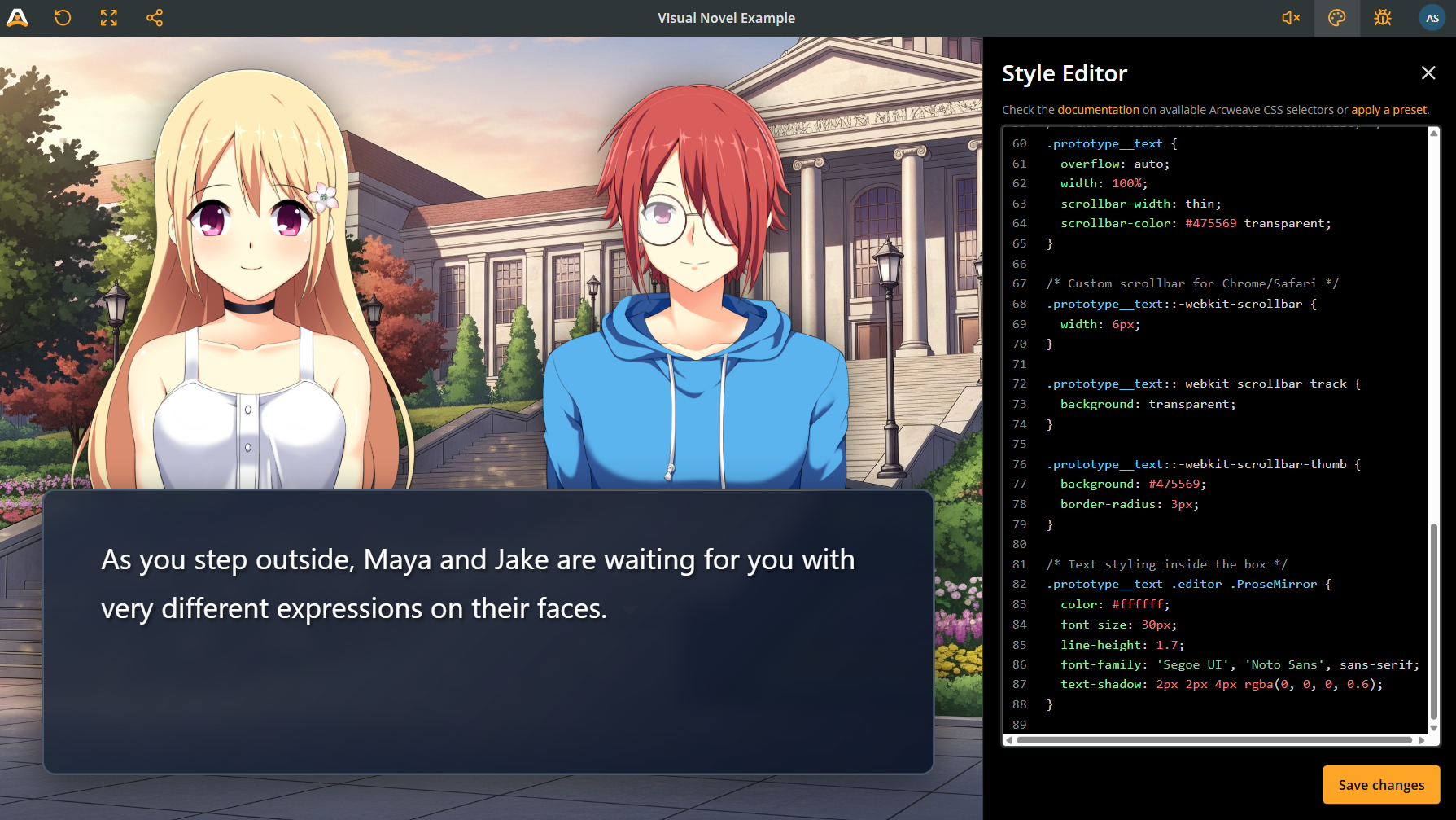
If your team has zero coding experience, skip the engine entirely. Arcweave's Play Mode lets you build browser-based interactive experiences with variables, conditions, and branching logic, no code required. Many jam submissions are text-based games or visual novels that win awards for strong writing and design. You can also customize Play Mode with CSS!
5. Submission & marketing: Make your game stand out
Game jams receive hundreds of submissions. A polished game page with compelling visuals gets 10x more plays than a great game with a blank page. Judges and players can't rate what they don't play.
Essential capture & editing tools:
OBS Studio
Free screen recording for trailers and gameplay footage (Windows/Mac/Linux)
ShareX
Windows screenshot tool with instant editing and cropping
ScreenToGif
Create gameplay GIFs in seconds (perfect for Twitter/Discord)
DaVinci Resolve
Professional video editing, completely free (no watermarks)
Canva
Quick thumbnail and banner design with game-friendly templates
Killer game page checklist:
- Eye-catching cover image (630×500px), use your most visually interesting moment, not your title screen
- 30-second trailer or GIF showing core gameplay loop in action
- 3-5 polished screenshots (1920×1080px) highlighting different mechanics or key moments
- Clear description: Hook (1 sentence) + What You Do (2 sentences) + Controls (bullet list)
- Credits: Name every team member, networking matters
The tools don't make the game, but they clear the path
The best game jam tools are invisible. They don't force you to think about them, they let you think about your story.
That's why we built Arcweave to be visual-first, browser-based, and export-ready. No installations. No configuration files. No "it works on my machine."
During our recent narrative jam, teams didn't spend time troubleshooting tools, they spent time building games. That's the difference.
Your preparation determines your success.
Don't wait until the theme drops to figure out your tools and workflow. Set them up now. Test them once. Then when the clock starts, you're building, not configuring.